
Troubleshooting
Troubleshooting
Errors people ran into while setting up Publit.Si, and the fix for each. Type your error message below, or pick a section. Most fixes link to the right spot in the docs, with a screenshot. Your coding agent knows this list too. Nothing helps? See Logs and support.
Install and start
pnpm local:setupshows ✗ forcloudflaredMac:
Fix it in “Install the tools” →brew install cloudflared. Windows:winget install Cloudflare.cloudflared, then open a new PowerShell window. Linux: the .deb/.rpm from github.com/cloudflare/cloudflared/releases or pkg.cloudflare.com.Windows: "Claude Code (
claude.exe) not found"Install Claude Code with the native installer (step 8); an npm install isn't found.
Fix it in “Turn on AI” →Windows:
pnpm ops:installcan't create a taskRun it in a normal (not elevated) PowerShell as the user who should run Publit.Si.
Fix it in “Start Publit.Si” →Linux:
systemctl --usersays "Failed to connect to bus"Log in as that user directly (desktop or
Fix it in “Start Publit.Si” →ssh user@server), not viasu/sudo -u. Proxmox/LXC:pct enterlogs you in as root – create a normal user and SSH in as that user (see "Linux server"). Without systemd, runpnpm devandpnpm servicesyourself (e.g. in tmux).Linux: services stop when you log out, or don't start after a reboot
Run
Fix it in “Start Publit.Si” →sudo loginctl enable-linger $USERonce (step 7).Update hangs, or the worker is stuck after "Update now"
Log in (over SSH on a server) as the user who runs Publit.Si and finish the update by hand:
cdinto thepublitsifolder, thenpnpm install && pnpm ops:install. Details are inlogs/update.logandrun/update.jsonin the data folder (Linux:~/.local/share/PublitSi/). On Linux, worker, gateway or tunnel may be off afterwards:pnpm ops:installstarts them again. From v1.13 the update runs as its own systemd user service and survives stopping the web service, also in LXC containers. Updating from an older version in a container: do it once by hand like this.Update stops at "next build" (e.g. v1.12.0:
Cannot find module '../../../site/…'), the app no longer startsFrom v1.13 the app keeps the last working build, and Update now goes back to the previous version by itself. On v1.12.0: in the
publitsifolder, movesrc/core/platforms/site-specs.test.tsand.next/devout of the folder, runpnpm ops:install, then put the test file back sogit statusis clean. Or update to v1.13 withgit pull && pnpm install && pnpm ops:install.Linux: "The master key is in the desktop keyring … but no keyring is reachable"
The key was stored in the keyring of your desktop session. Run Publit.Si in that session, and install
Fix it in “Install the tools” →secret-tool(libsecret-tools; Fedora:libsecret).Migration says the database is busy
Stop
pnpm devand close old Claude Code, Codex, Cursor or OpenCode sessions; the command lists the processes.localhost:3000shows "404 – not found" or another appAnother program uses port 3000 too. Open
http://127.0.0.1:3000, then pick another port under Settings › General › Address – Publit.Si restarts on it. With an autostart from before v1.6.1, runpnpm ops:installonce. Update the YouTube and Search Console redirect URIs in Google Cloud afterwards.
Tunnel
Tunnel stays red
Check
~/.cloudflared/publitsi.yml(UUID, credentials file, hostname) andPUBLITSI_PUBLIC_URL. With Tailscale Funnel:tailscale funnel statusmust list port 3100 and the same address asPUBLITSI_PUBLIC_URL.Fix it in “Open a tunnel with Cloudflare” →Show where to fix it
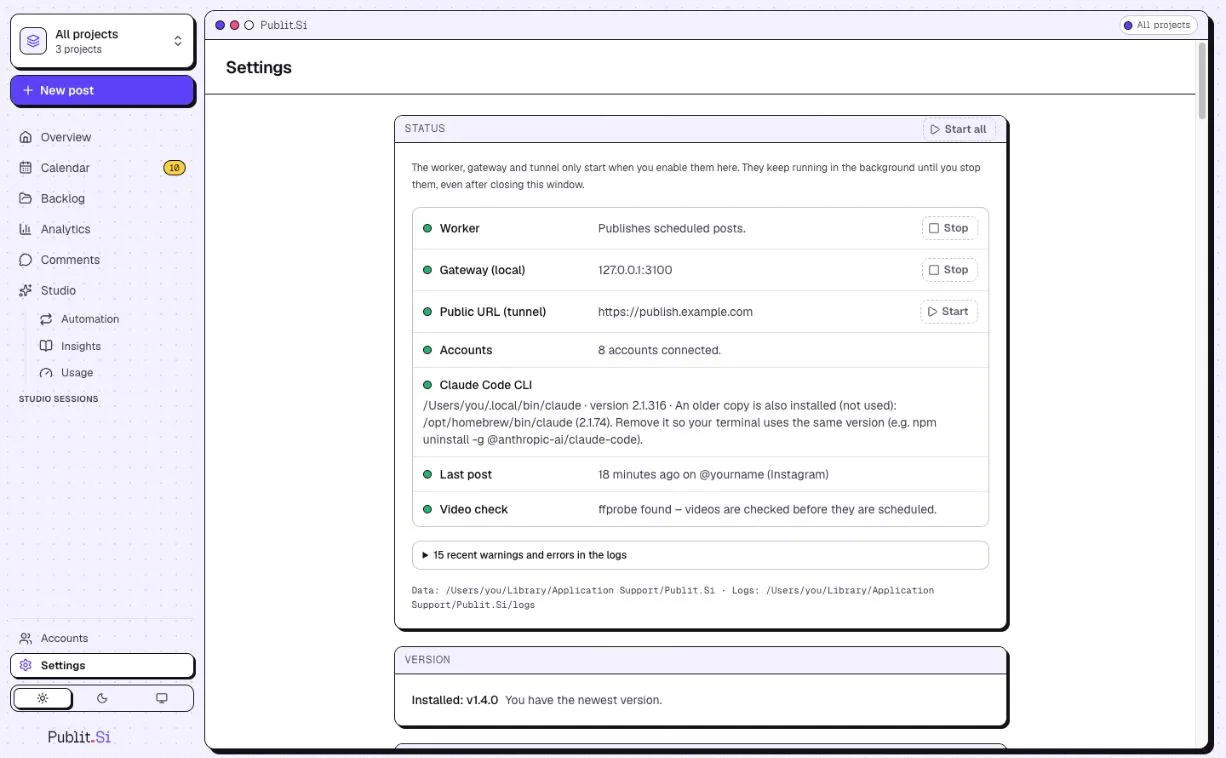
- 1:Worker
- 2:Public URL (tunnel)
Connecting any platform
redirect_uri_mismatchThe redirect URI in the dashboard must match exactly, including
http/httpsand port.In depth: causes, steps and sources →Show where to fix it
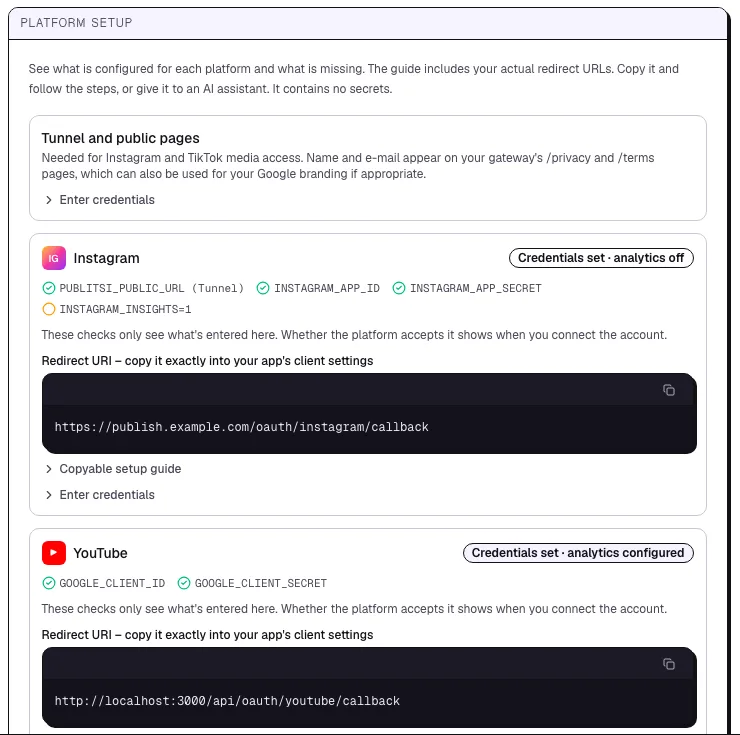
- 1:Status of the platform
- 2:Redirect URI to copy
Facebook: "missing permission pages_…"
The Pages permissions aren't in the use case or the login configuration. Add them under Use cases → Manage everything on your Page → Customize → Permissions and features, tick them in the configuration (step 4c.3–4), then connect again and allow all.
In depth: causes, steps and sources →
Instagram: "Insufficient developer role"
The account hasn't accepted the tester invitation, or Chrome is signed in to another account.
Fix it in “Connect Instagram” →In depth: causes, steps and sources →Show where to fix it
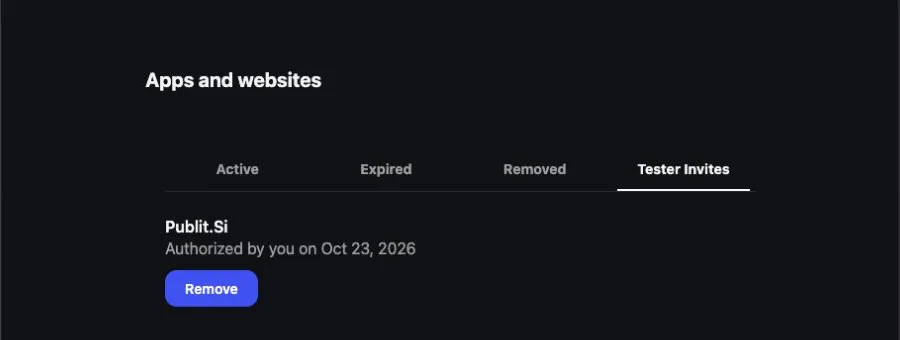
- 1:Tester Invites
- 2:Your app
Instagram: "Invalid scope"
Old way (4b): a permission from step 4b.3 is missing. Switch off Instagram: views and reach under Settings › Platforms › Statistics and comments (or set
INSTAGRAM_INSIGHTS=0and restart), then reconnect.Fix it in “Connect Instagram” →In depth: causes, steps and sources →Show where to fix it
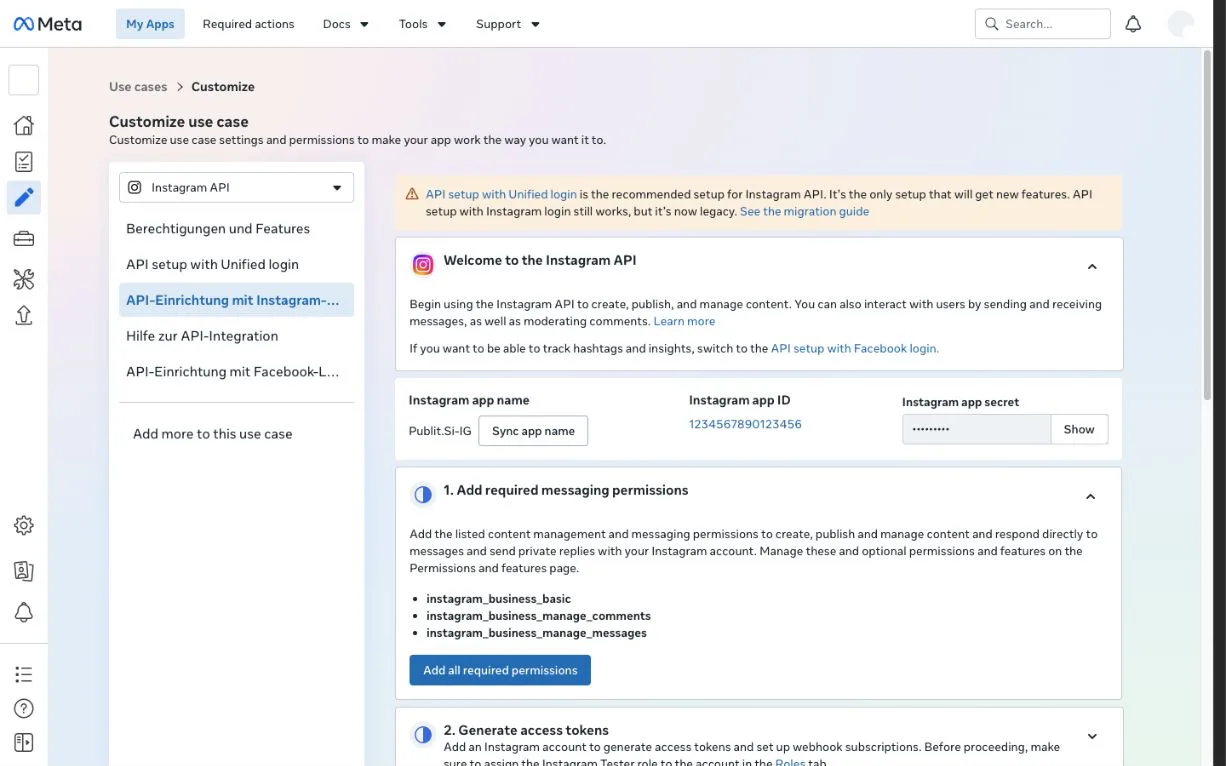
- 1:API setup with Instagram login
- 2:Instagram app ID
- 3:App secret (Show)
- 4:Permissions
Meta: "API setup with Instagram login is not available for newer apps"
Your app is new. Set it up with Unified login (step 4a).
Fix it in “Connect Instagram” →Show where to fix it
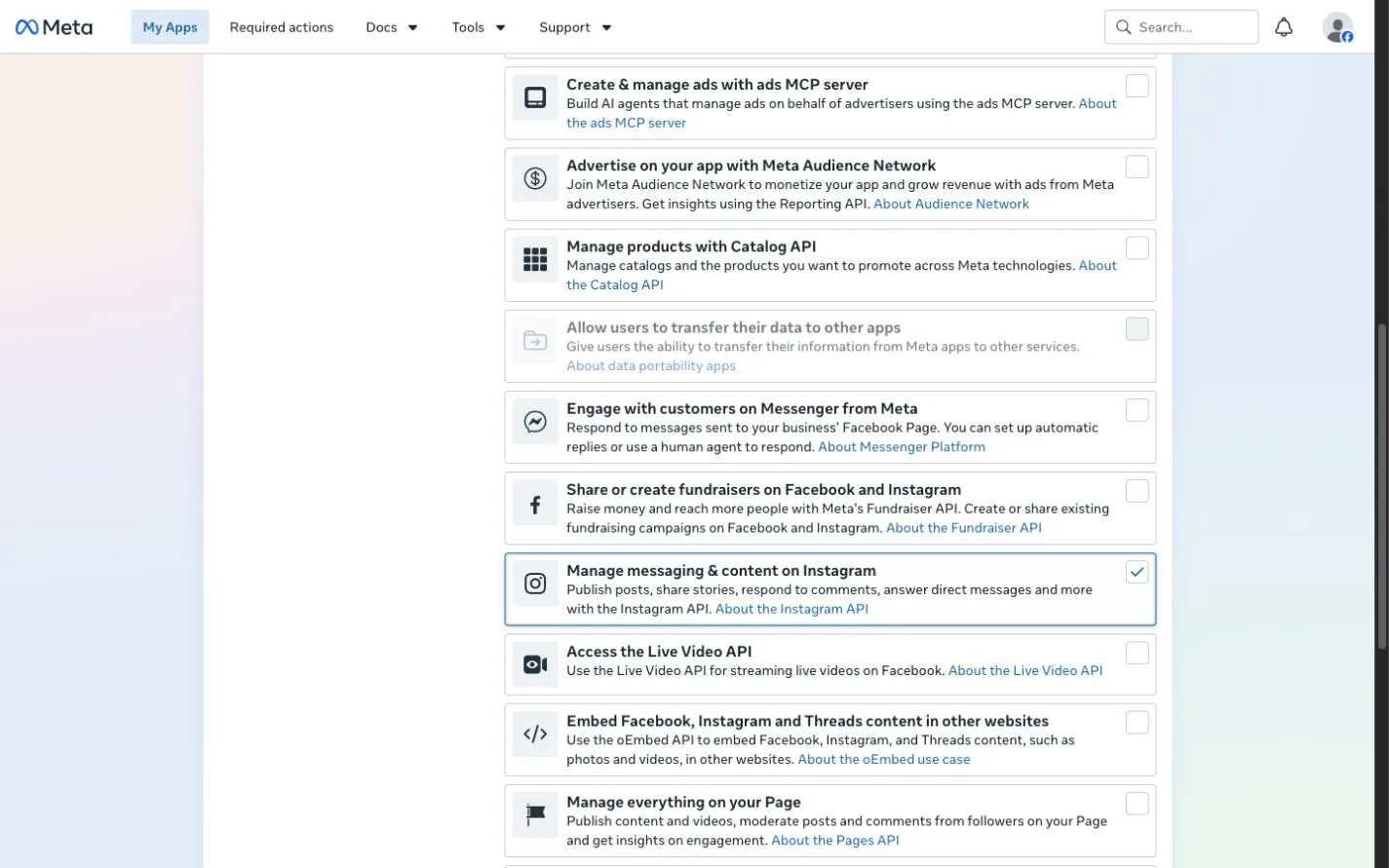
- 1:Manage messaging & content on Instagram
Instagram: "Invalid platform app" or "Invalid Scopes"
The login still went the old way with a new app. Set
INSTAGRAM_UNIFIED_APP_ID,INSTAGRAM_UNIFIED_APP_SECRETandINSTAGRAM_UNIFIED_CONFIG_ID(step 4a.6), restart and connect again.Fix it in “Connect Instagram” →In depth: causes, steps and sources →Show where to fix it
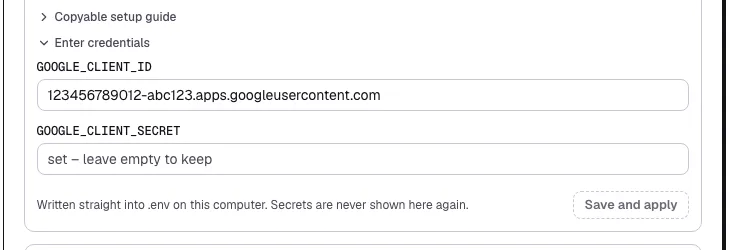
- 1:Client ID
- 2:Save and apply
.envfor you and restarts the services. Secrets are never shown again.Instagram: "Meta did not say which Instagram account you shared"
Set
Fix it in “Connect Instagram” →INSTAGRAM_UNIFIED_ACCOUNT_IDto the account's ID (step 4a.7), restart and connect again. Or add the optional permissionbusiness_management(step 4a.4), then Publit.Si can usually find the account itself.Instagram: "… is not reachable with this login"
The ID in
Fix it in “Connect Instagram” →INSTAGRAM_UNIFIED_ACCOUNT_IDis wrong, or you didn't choose that account in Meta's dialog. Check the ID in Meta Business Suite → Settings → Instagram accounts.Instagram: "publishing permission is missing"
Unified login (4a):
instagram_content_publishisn't in your login configuration, or it was unticked in Meta's dialog. Not offered in the configuration? Add it under Use cases → Manage messaging & content on Instagram → Customize → Permissions and features first (step 4a.4). Then connect again and allow all.Meta's configuration template wants to create an ad account
Remove ad accounts and the ads permissions from the configuration (step 4a.4). Publit.Si needs none.
Fix it in “Connect Instagram” →Instagram can't load media
Bot Fight Mode is still on for the tunnel host.
Fix it in “Open a tunnel with Cloudflare” →Show where to fix it
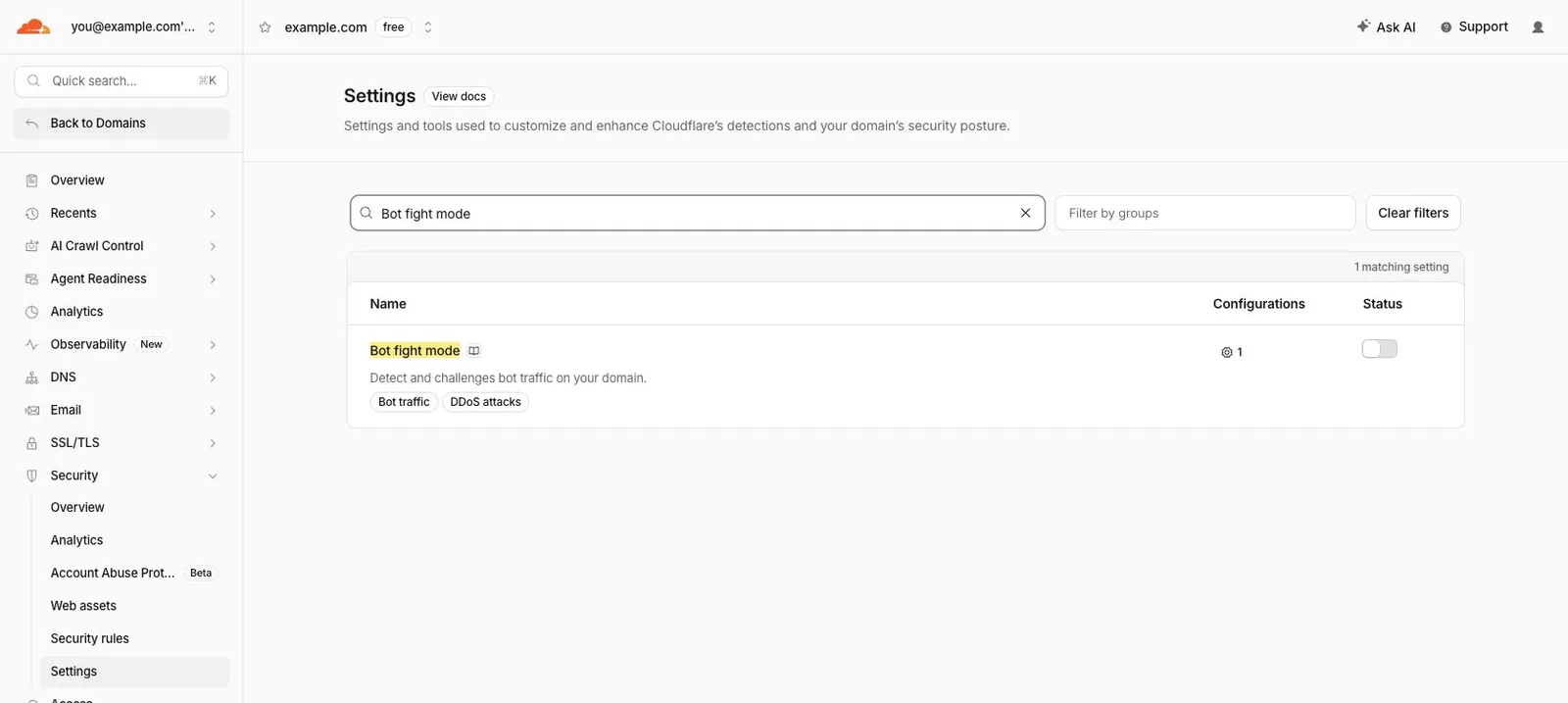
- 1:Security › Settings
- 2:Search “Bot fight mode”
- 3:Off
LinkedIn post says “status unclear”, or LinkedIn asks to reconnect
Status unclear: publishing stopped while the post was being sent, and LinkedIn doesn't let these apps read posts back. Check your LinkedIn profile, and click Try again only if the post isn't there. Reconnect: the login lasts 60 days – connect the profile again under Accounts.
Fix it in “Connect LinkedIn” →
YouTube
Most YouTube problems come from Google's test mode: add yourself as a test user, and reconnect every 7 days or switch to production. Test mode or production? →
YouTube: "Access blocked: Google's review of … was not completed" (
403 access_denied)Your Google project is in test mode and your account isn't on the list yet. In your own Google project: Audience → Test users → + Add users, add the Google account you connect with, save and connect again (step 5.2). No Branding, domain or publishing is needed for this. The sign-in then lasts 7 days; to skip the weekly reconnect see step 5, "YouTube without the weekly reconnect".
Fix it in “Connect YouTube” →In depth: causes, steps and sources →Show where to fix it
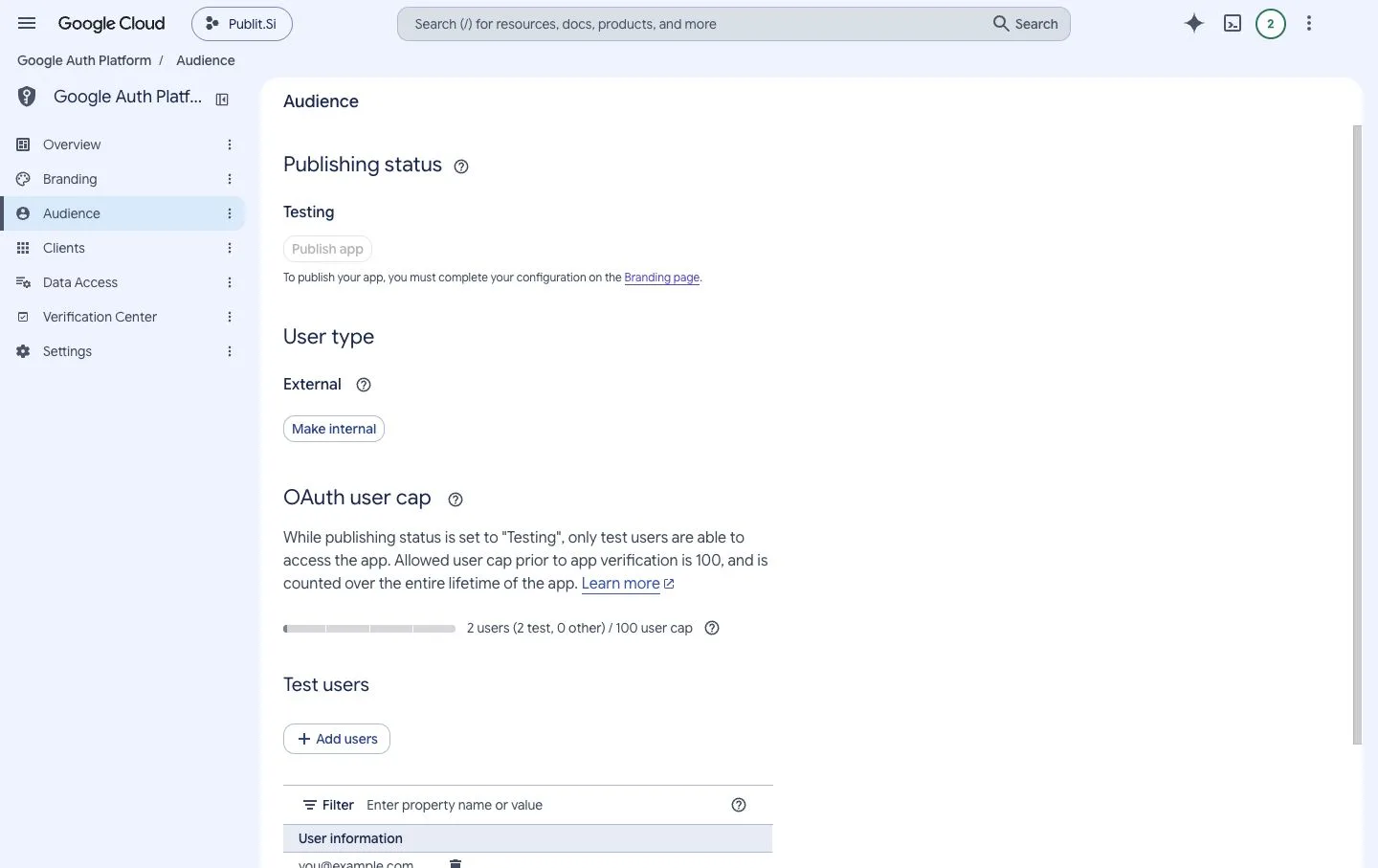
- 1:Testing
- 2:External
- 3:Add users
YouTube: "Publish app" is disabled and asks to complete Branding
You only need this to skip the weekly reconnect; as a test user you can connect right away. Google wants a homepage, privacy policy and terms on your own domain. With the Cloudflare tunnel (step 3), your gateway serves all three: https://your-host/, /privacy and /terms. Add your domain under Authorized domains and save. See step 5, "YouTube without the weekly reconnect".
Fix it in “Connect YouTube” →Show where to fix it
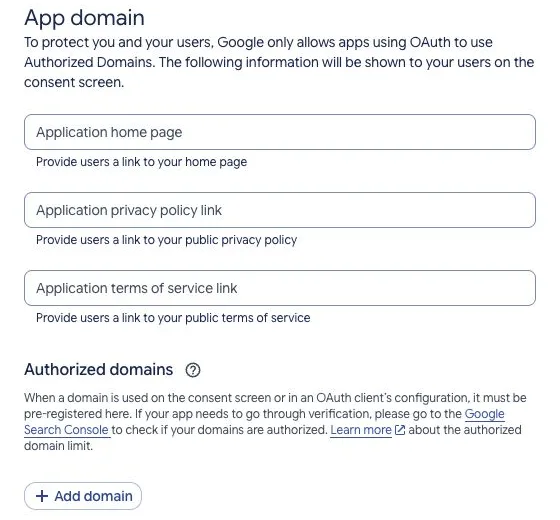
- 1:Home page, privacy, terms
- 2:Add domain
YouTube: "Google hasn't verified this app"
In test mode Google shows “You've been given access to an app that's currently being tested”: choose Continue. In production the unverified app shows Advanced → Go to … (unsafe). Both are fine for the project you created yourself. This warning differs from the blocked 403 screen, which needs a test-user entry in Testing.
Fix it in “Connect YouTube” →In depth: causes, steps and sources →Show where to fix it
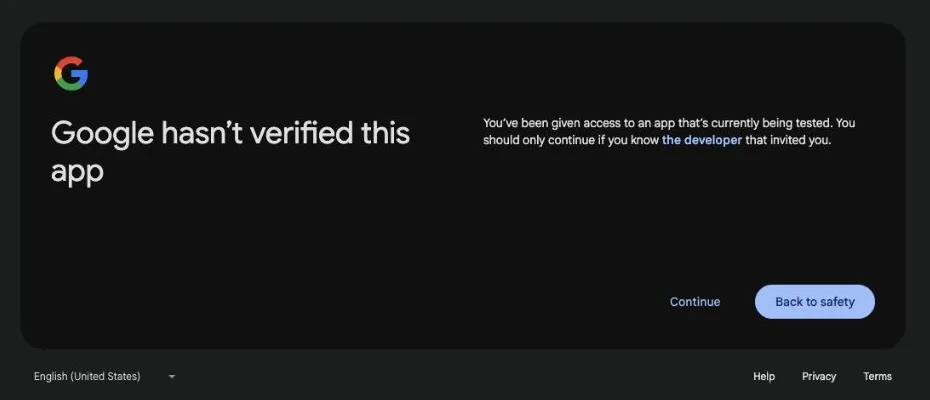
- 1:Continue
YouTube asks to sign in again after a week
In Google's test mode the sign-in ends after 7 days. Reconnect, or switch your Google project to production (step 5, "YouTube without the weekly reconnect") and reconnect once.
Fix it in “Connect YouTube” →In depth: causes, steps and sources →Show where to fix it
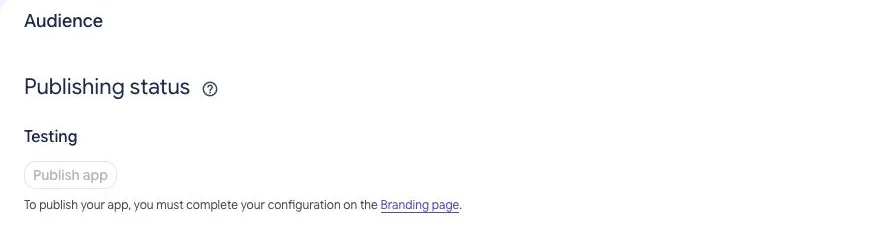
- 1:Testing
- 2:Publish app
YouTube: "renews automatically" but access stopped after 7 days
Publit.Si renews the short access token, but in Google's test mode the sign-in behind it still ends after 7 days. Check Google Auth Platform → Audience → Publishing status. Switch to production (step 5, "YouTube without the weekly reconnect"), then Accounts → open the account → Reconnect.
Fix it in “Connect YouTube” →YouTube: added as a test user but the same 403 still appears
Check the exact Google-account email selected during sign-in, not an alias or channel name. Confirm the saved client ID belongs to the Google project whose test-user list you changed. Save, then start a fresh connection. If the message names an organization policy, ask your Google Workspace administrator.
Fix it in “Connect YouTube” →In depth: causes, steps and sources →Show where to fix it
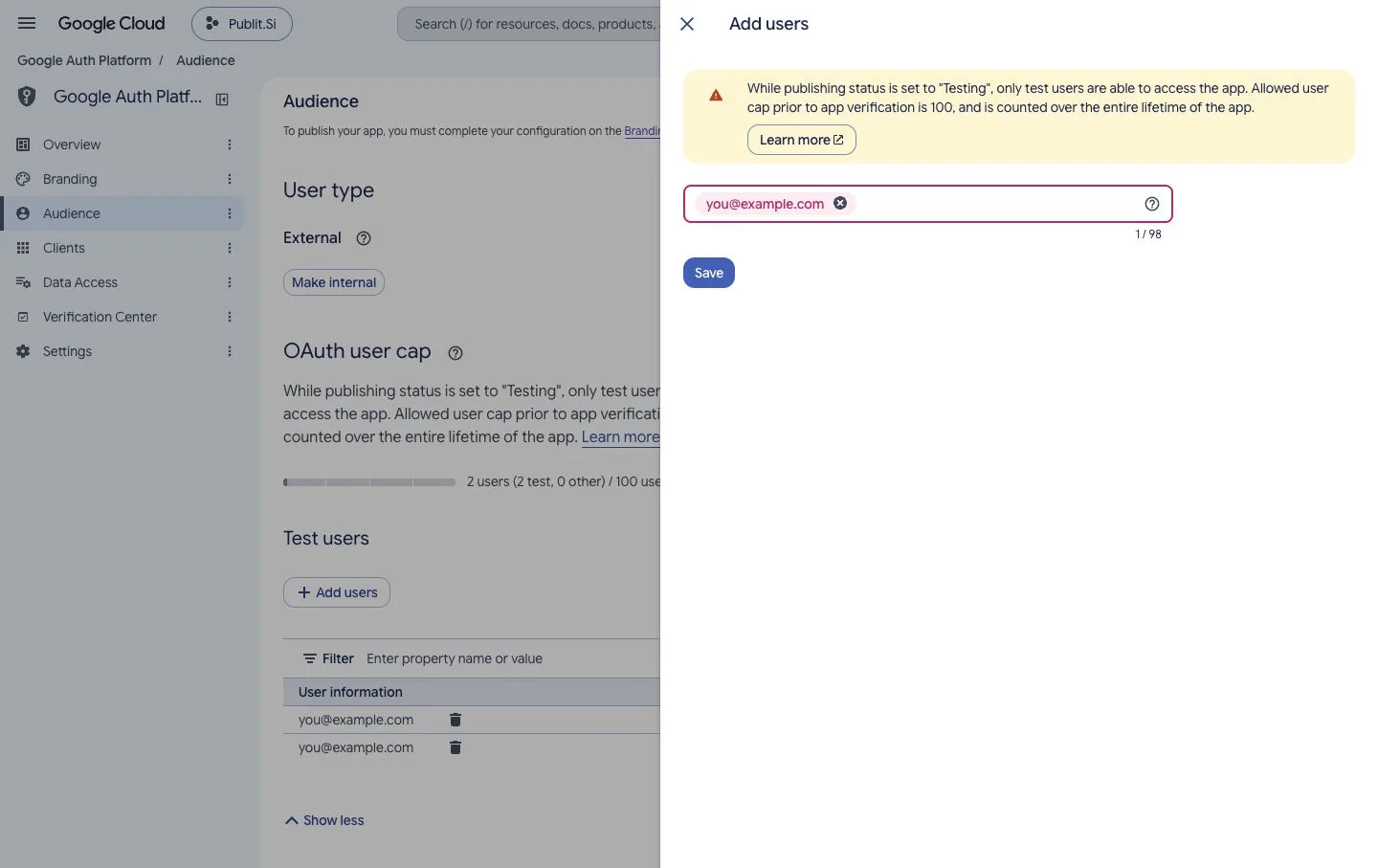
- 1:Your Google account
- 2:Save
YouTube: Branding rejects the domain or asks to verify ownership
Authorized domains takes a domain such as example.com, without https:// or a path. Do not enter localhost, the callback URL or publit.si. Use your tunnel's domain: your gateway serves the homepage, /privacy and /terms there. If requested, verify it in Google Search Console using a project owner/editor. The local callback stays under Clients → Authorized redirect URIs.
Fix it in “Connect YouTube” →Show where to fix it
- 1:Home page, privacy, terms
- 2:Add domain
YouTube:
invalid_client,unauthorized_clientor invalid Google client credentialsUse the Web application OAuth client's ID and matching secret from the same Google project. Enter them under Settings → Platform setup → YouTube → Enter credentials → Save and apply. After changing them, reconnect the account. Repeatedly reconnecting with the wrong credentials will not fix this.
Fix it in “Connect YouTube” →In depth: causes, steps and sources →Show where to fix it
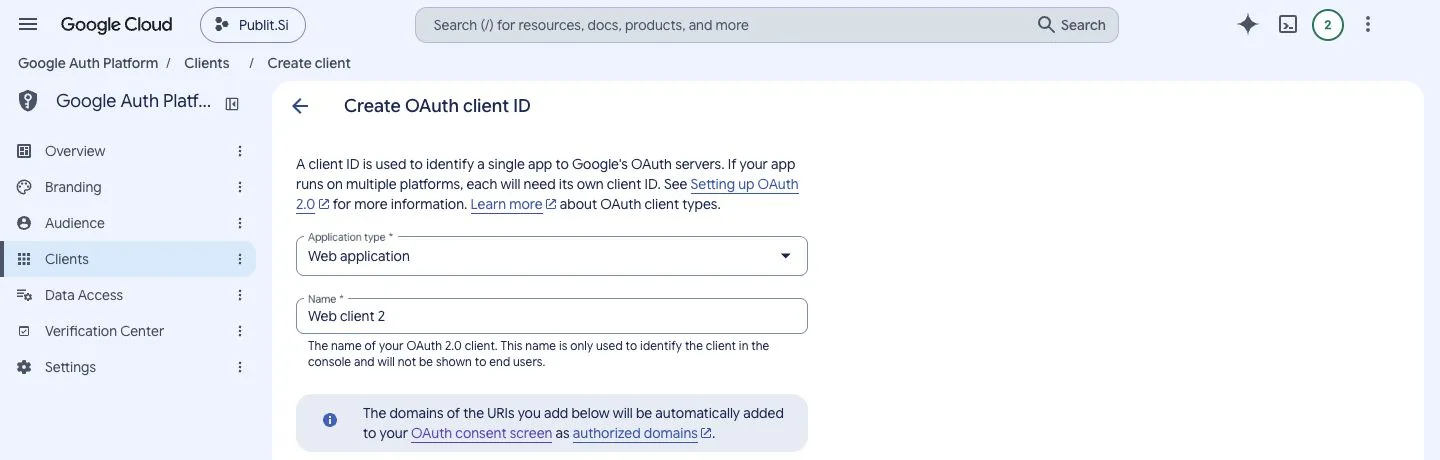
- 1:Clients
- 2:Web application
YouTube:
invalid_grant, access expired/revoked or Reconnect requiredUse Accounts → open the YouTube account → Reconnect; do not disconnect it first, because disconnecting cancels scheduled posts. If it happens after a week, your Google project is in test mode; see step 5, "YouTube without the weekly reconnect". Google may also revoke access or apply account policies; this error alone cannot identify the cause.
Fix it in “Connect YouTube” →In depth: causes, steps and sources →YouTube: API disabled,
SERVICE_DISABLEDoraccessNotConfiguredin an API responseIn the project matching your saved client ID, APIs & Services → Library: enable YouTube Data API v3. For watch-time reports also enable YouTube Analytics API. Wait for Google to apply the change and retry. A sign-in page referring to Workspace administrator configuration instead needs that administrator's help.
Fix it in “Connect YouTube” →In depth: causes, steps and sources →Show where to fix it
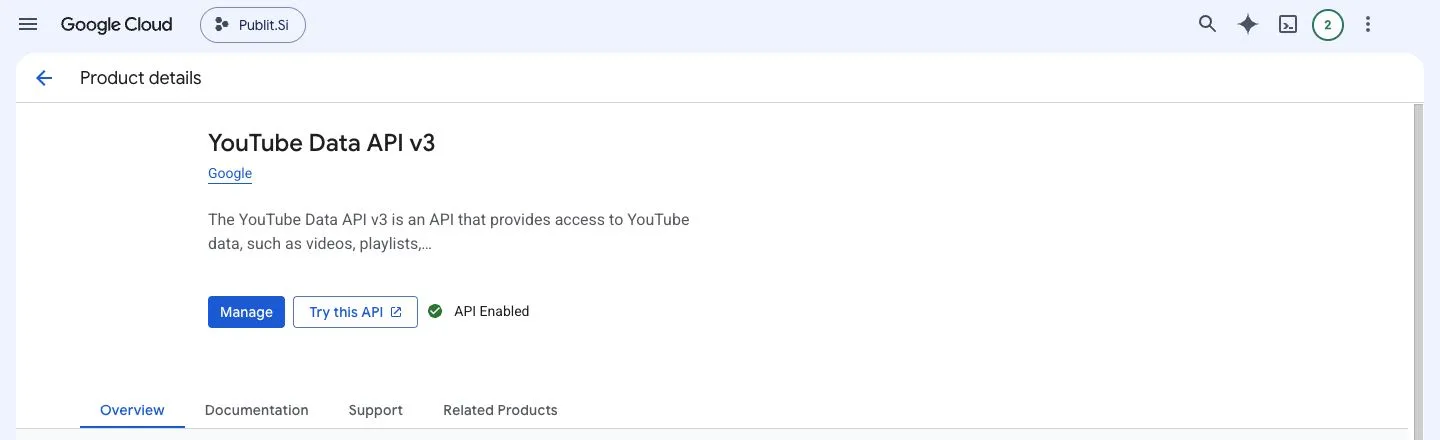
- 1:Enable / Manage
YouTube: no YouTube channel, wrong channel or missing Brand Account
Sign in to YouTube with that Google account and confirm it has access to the intended channel. Create a channel if it has none. Reconnect in Publit.Si and choose the intended channel; a personal channel can be listed under your Google-account name. For a Brand Account in Testing, list its managing Google account as a test user.
Fix it in “Connect YouTube” →YouTube: upload permission denied,
insufficientPermissionsor uploads ahead need reconnectingReconnect the account. On Google's permission screen the three YouTube boxes start unticked: tick Select all, then Continue. Uploading ahead with YouTube publishing later also needs permission to manage the uploaded video; without it, Publit.Si uploads at the scheduled time. For partial statistics, check the enabled APIs and granted permissions. If Google offers no way to grant access, inspect the policy or verification message rather than repeating the connection.
Fix it in “Connect YouTube” →YouTube:
admin_policy_enforced,org_internalor an organization blocks accessFor org_internal, check the intended Audience setting; a project restricted to Internal only accepts its organization members. For an account-policy block, ask your Google Workspace administrator to review this OAuth client's access. Adding a test user or switching to production cannot override organization policies.
In depth: causes, steps and sources →YouTube:
quotaExceededoruploadLimitExceededCheck Settings → Limits today and the Google project's API quotas. Connected channels using the same project share its project quota; channels may also have their own upload limits. Publit.Si waits and retries rate-limited work. Project daily quotas reset at midnight Pacific Time; a channel limit may need a separate wait. Reconnecting does not raise a quota.
In depth: causes, steps and sources →YouTube: browser cannot open localhost after Google sign-in
Keep Publit.Si running and use the exact callback shown under Settings → Platform setup → YouTube, including host and port. Open the app on the same computer as the browser, or use the SSH tunnel described in SETUP.md for a server. A phone or another computer's localhost points to that device, not your Publit.Si installation.
Fix it in “Connect YouTube” →Show where to fix it
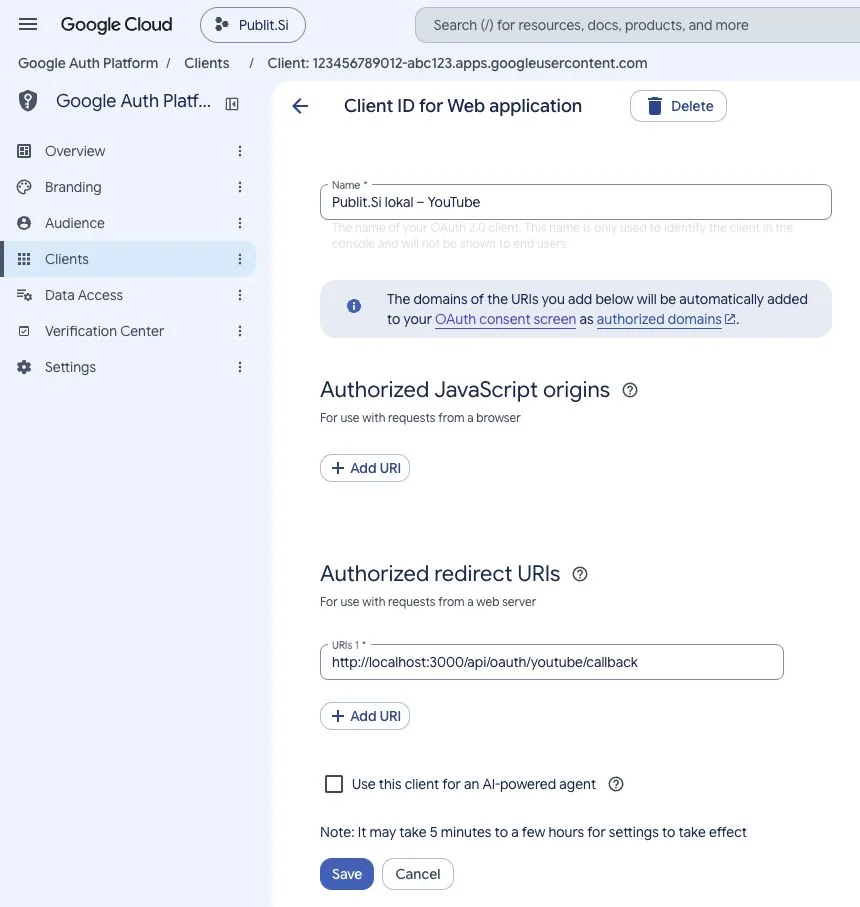
- 1:JavaScript origins: leave empty
- 2:Authorized redirect URIs
X
X post never shows as published
An X post is only marked published after you click It’s online on its copy page or in the queue. Publit.Si fills in nothing on x.com and cannot see what you post there. Still waiting? Open Queue › Waiting for you, click It’s online and paste the post's link.
Fix it in “Connect X” →
TikTok
TikTok rejects the login with a scope error
The statistics scopes aren't enabled. Switch off TikTok: statistics under Settings › Platforms › Statistics and comments (or set
TIKTOK_ANALYTICS=0and restart), then reconnect.Fix it in “Connect TikTok” →Show where to fix it
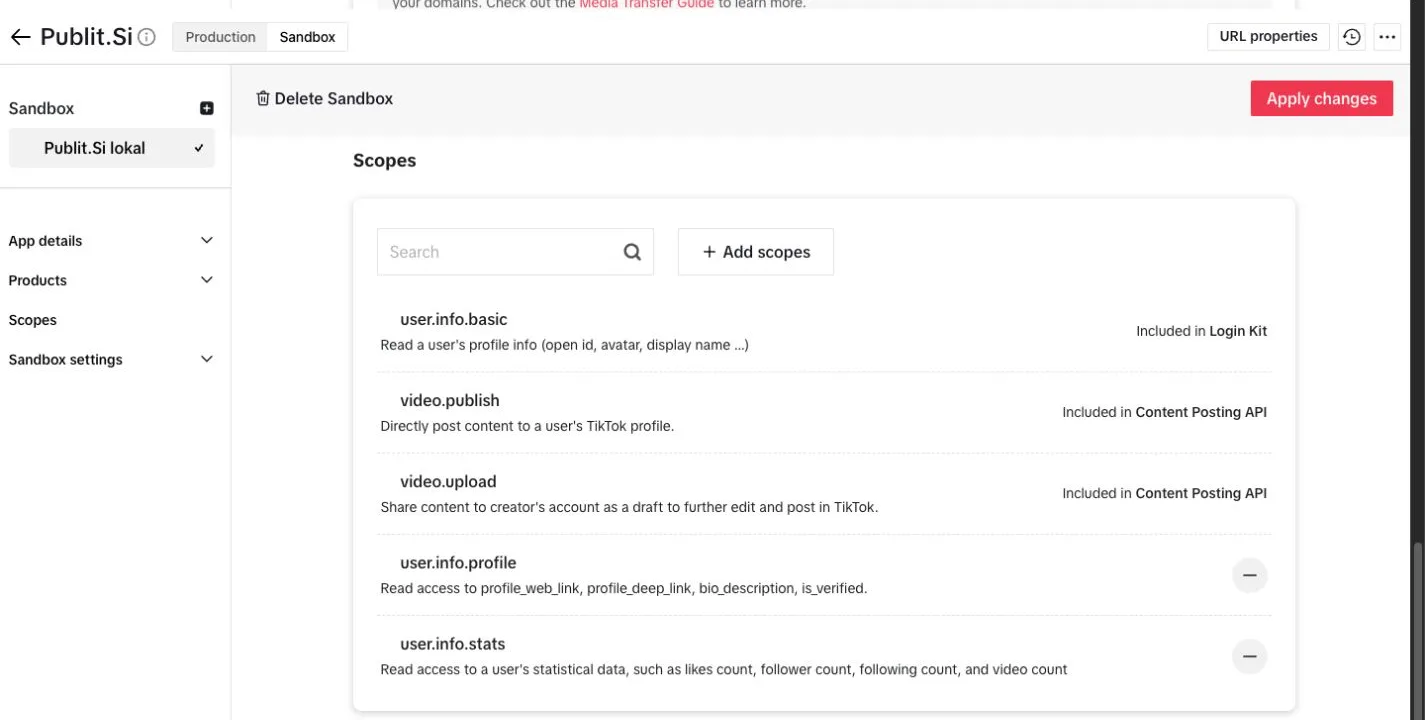
- 1:user.info.basic
- 2:video.publish
- 3:video.upload
user.info.statsandvideo.list(Display API).TikTok post never gets marked as published
By default, confirm "It’s online" on the copy page or in the queue after posting yourself. With the optional extension, check it is installed in the right Chrome profile and turned on for this account; confirm "It’s online" yourself if needed.
Fix it in “Connect TikTok” →Show where to fix it
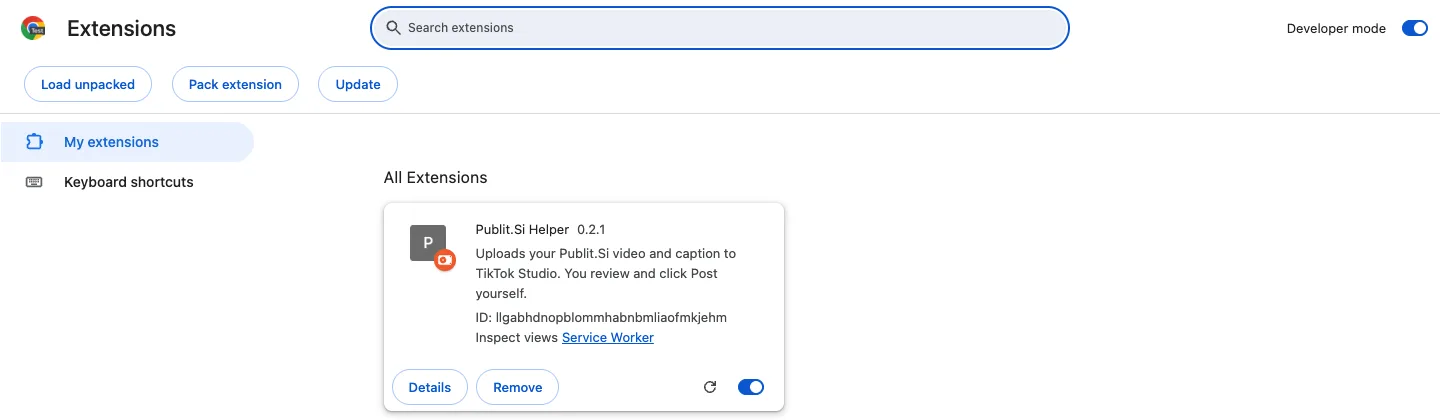
- 1:Developer mode
- 2:Load unpacked
- 3:Publit.Si Helper
chrome://extensions→ Developer mode on → Load unpacked → theextension/folder.
Studio and AI
Daily Shorts run fails: the agent is not installed or signed out
Sign in in a terminal (
Fix it in “Turn on AI” →claude /login,codex loginorcursor-agent login), then click Run now, or pick another agent in the automation.The agent changes files in my app's repository
Link the project to a separate marketing folder instead: Studio → Change project folder → Create a marketing folder.
Blog
Blog: Search Console shows "No property found"
Add the website in Google Search Console with the Google account you connected, or connect with the account that owns it.
Blog: Search Console connected but no numbers
Check that the post address in the blog settings matches the real addresses (Test button). Google reports numbers 2–3 days late.
Blog: "… is checked out right now" when saving a post
The post's branch
blog/<slug>is checked out in your repository. Switch to another branch, then save again.
Still stuck? The logs and how to reach us are on Logs and support.