
Start Publit.Si
Publit.Si runs four small services: the app, a worker that posts on time, the gateway and the tunnel. Let them start with your computer, or start them by hand.
Start automatically (recommended)
In the
publitsifolder:pnpm ops:installIt builds the app and starts everything at every login. Publit.Si opens at localhost:3000 once it's ready.
Mac: LaunchAgents. Windows: tasks in the Task Scheduler (folder
PublitSi) that run without a window and restart if they crash. Linux: systemd user services; check them withsystemctl --user status 'publitsi-*'.To remove them again:
pnpm ops:uninstall.
Linux server: user services stop at logout. Run sudo loginctl enable-linger $USER once so Publit.Si keeps running and starts at boot.
Or start by hand
Run
pnpm dev, open localhost:3000, go to Settings › Status and click Start all.
Check the status
Settings › Status shows worker, gateway and tunnel. All green means Publit.Si can post.
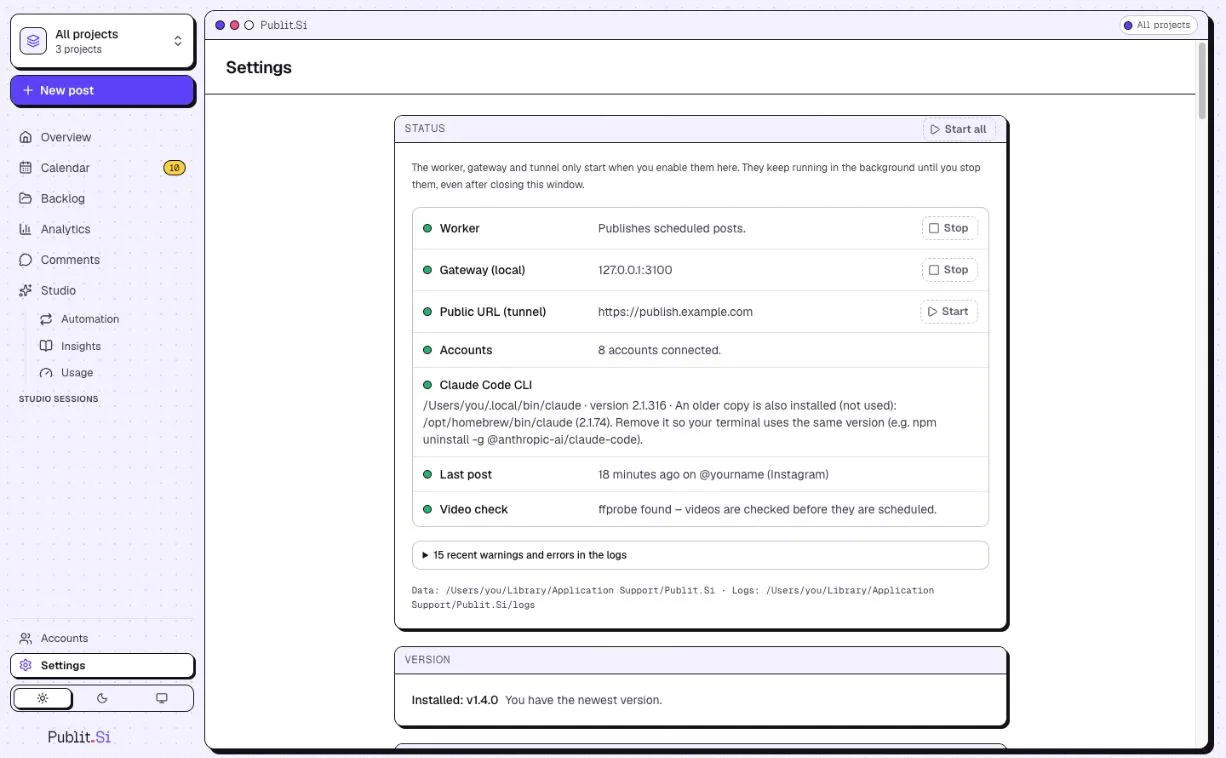
- 1:Worker
- 2:Public URL (tunnel)
On the Mac, the first notification asks whether “PublitSi” may send notifications. Click Allow.
Want to look around first? The Overview offers Explore with demo data. It never posts anything real; Remove demo takes it away.
Your computer must be on and awake when posts are due. Missed posts go out when it wakes, within two hours by default. Public YouTube videos are uploaded ahead, so for those the computer may be off.
Check
Settings › Status shows worker, gateway and tunnel in green (YouTube only: the tunnel may stay off). After changing .env, run pnpm ops:install again.
Common problems
Stuck? Write to us. We're happy to help. Leave out secrets and tokens.